AI for Month-End Variance Commentary: Prompts That Work
Oct 08, 2026
Writing variance commentary is the most soul-crushing task in FP&A. You already know the numbers. You already know the drivers. But every month, you spend days translating that knowledge into formatted paragraphs for people who will skim them in two minutes. Seventy percent of CFOs say their team's workload is the biggest obstacle to extracting value from data and technology (SolveXia, 2026). Commentary writing is where that workload bottleneck hits hardest.
Workday's 2025 CFO AI Indicator Report found 88% of FP&A teams already use AI for data analysis, but only 66% apply it to narrative generation (Workday, 2025). That 22-point gap represents a massive untapped opportunity, because narrative generation is exactly what large language models do best.
This tutorial gives you tested, copy-ready prompts for every type of variance commentary you'll write during a month-end close. No platform purchase required. Just your data and an AI assistant.
|
TL;DR AI generates first-draft variance commentary in minutes, saving 8-12 analyst hours per close cycle. These tested prompts cover P&L variances, balance sheet movements, KPI commentary, and executive summaries with output formats ready for CFO review. 66% of FP&A teams already use AI for narratives per Workday's 2025 report. |
Why Is Variance Commentary the Best Starting Point for AI?
SAP's implementation data shows AI-powered financial closing achieves 621% ROI and 22% less closing time for customers (PYMNTS, 2026). Commentary generation is the entry point that delivers the fastest wins because it requires no system integration, no data pipeline, and no change management beyond "try this prompt."
Here's why commentary is uniquely suited for AI:
- Structured input: Actuals vs. budget is tabular data (AI's native format)
- Formulaic output: "X was $Y above/below budget due to Z" follows a clear pattern
- High frequency: Monthly repetition means the prompt improves with each cycle
- Low risk: A human reviews the output before anyone else sees it
- Immediate ROI: No platform purchase, no integration, no training budget
Commentary generation sits in the sweet spot where AI capability is high and human review overhead is low. Compare that to strategic narrative (where AI needs heavy editing) or data extraction (where AI needs system access). Commentary is the Goldilocks use case.
Citation: According to Workday's 2025 CFO AI Indicator Report, 88% of FP&A teams use AI for data analysis but only 66% apply it to narrative generation, a 22-point gap that represents the most accessible AI opportunity in finance, requiring no system integration and delivering 8-12 hours of analyst time savings per close cycle ([Workday](https://blog.workday.com/en-us/cfo-ai-indicator-report-how-finance-leaders-use-ai.html), 2025).
What Are the Tested Prompts for P&L Variance Commentary?
BCG's 2025 survey found 44% of finance teams have moved AI into scaled deployment, with efficiency gains concentrating in exactly this kind of structured, repeatable output (BCG, 2025). Here are the prompts that work.
Prompt 1: Full P&L Variance Commentary
```
I'm uploading our [Month Year] P&L with columns: Account, Budget, Actual,
Variance ($), Variance (%).
For every line item where the absolute variance exceeds $[threshold] OR
the percentage variance exceeds [X]%, write a 2-sentence commentary:
- Sentence 1: State the variance amount, direction (favorable/unfavorable),
and percentage.
- Sentence 2: Suggest the most likely driver based on the data patterns
and common business drivers for this account type.
Format as a table: | Account | Variance | Commentary |
Tone: direct and specific. Avoid vague phrases like "due to various factors."
Every explanation must cite a specific driver.
```
Example output:
|
Line item |
Variance |
Reason |
|---|---|---|
|
Revenue - Product A |
+$180K (12% favorable) |
Product A revenue exceeded budget by $180K (12%), driven primarily by the new enterprise pricing tier launched in February that converted 14 accounts at higher ACV. This represents the second consecutive month of above-budget performance in this line. |
|
Marketing Expense |
-$95K (23% unfavorable) |
Marketing expense exceeded budget by $95K (23%), driven by accelerated spend on the Q1 brand campaign that was originally budgeted for Q2. Adjusting for timing, full-year marketing is tracking within 3% of plan. |
Prompt 2: Revenue Bridge Narrative
```
Using the attached revenue data, write a revenue bridge narrative for
[Month Year] that explains the walk from budget to actual. Structure as:
- Opening: State total revenue actual vs. budget ($ and %)
- Volume effect: How much of the variance came from unit/customer volume
- Price effect: How much from pricing changes or mix shift
- New business: Contribution from new customers or products
- Churn/attrition: Impact from lost customers or downgrades
- Closing: Net assessment (is this structural or one-time?)
Keep the total narrative to 150-200 words. Use specific dollar amounts,
not percentages alone.
```
Prompt 3: OpEx Variance by Department
```
I'm uploading operating expense data by department for [Month Year].
Columns: Department, Category, Budget, Actual, Variance.
For each department with a total variance exceeding $[threshold]:
- Write a 3-sentence department summary:
- Sentence 1: Total department variance ($ and %)
- Sentence 2: The single largest driver within the department
- Sentence 3: Whether this is a timing difference, run-rate change,
or one-time item
- Flag any departments where headcount actuals differ from plan —
this is usually the primary driver of OpEx variance.
Group the output by: Departments Over Budget | Departments Under Budget
|
Practitioner note I've tested these prompts across dozens of close cycles. The single biggest improvement to output quality comes from including prior-month commentary alongside the current data. When the AI sees how you explained last month's marketing overspend, it calibrates its tone and specificity level for this month. Include 2-3 months of historical commentary in your prompt for best results. |
How Do You Write AI Prompts for Balance Sheet and Cash Flow Commentary?
The average month-end close still takes 6-10 business days at most organizations, with commentary generation consuming a significant portion of that cycle (APQC Open Standards Benchmarking, 2025). Balance sheet and cash flow commentary is often more complex than P&L because it requires explaining stock positions, not flow changes. These prompts handle the complexity.
Prompt 4: Balance Sheet Movement Commentary
```
I'm uploading our balance sheet as of [Date] with columns: Account,
Prior Period, Current Period, Change ($), Change (%).
For accounts where the change exceeds $[threshold] or [X]%:
- Explain the movement in 2 sentences:
- Sentence 1: State the change ($ and direction)
- Sentence 2: Explain the driver and whether it's expected or
requires investigation
- Flag any balance sheet accounts where the movement seems
inconsistent with P&L trends (e.g., AR growing while revenue is flat
could signal collection issues).
Group by: Current Assets | Non-Current Assets | Current Liabilities |
Non-Current Liabilities | Equity
```
Prompt 5: Cash Flow Variance Narrative
```
Using the attached cash flow statement (actual vs. budget) for [Month Year]:
- Write a 200-word executive summary covering:
- Operating cash flow: actual vs. budget and primary driver
- Investing cash flow: any significant capex variances
- Financing cash flow: debt or equity movements
- Net cash position and runway implication
- For the top 3 cash variances by absolute value, provide:
- The variance amount
- Root cause (operating, timing, or structural)
- Whether this impacts forward cash projections
- Recommended action (if any)
Tone: suitable for CFO and board review. Be specific about numbers.
```
Prompt 6: KPI Scorecard Commentary
```
I'm uploading our monthly KPI dashboard with columns: Metric, Target,
Actual, Prior Month, YoY Change.
For each KPI:
- Assign a status: Green (within 5% of target), Yellow (5-15% off),
Red (>15% off)
- Write one sentence explaining the current performance
- Write one sentence on the trend direction (improving, stable, declining)
based on the 3-month trajectory
- For any Red KPI, add a third sentence recommending an investigation area
Format as: | KPI | Status | Commentary |
```
Citation: The average month-end close takes 6-10 business days according to APQC Open Standards Benchmarking data with best-in-class teams closing in 4 days and laggards taking 8 or more. Variance commentary and narrative drafting consume 2-3 of those days, making it the single largest time block that AI can compress without requiring any system integration ([APQC](https://www.apqc.org/benchmarking), 2025).
What Makes an AI Variance Prompt Actually Work?
Protiviti's 2025 Global Finance Trends Survey found 72% of finance leaders now use AI tools, up from 34% the prior year (Protiviti, 2025). But using AI and getting good output from AI are different things. Here's what separates prompts that produce usable commentary from prompts that produce generic filler.
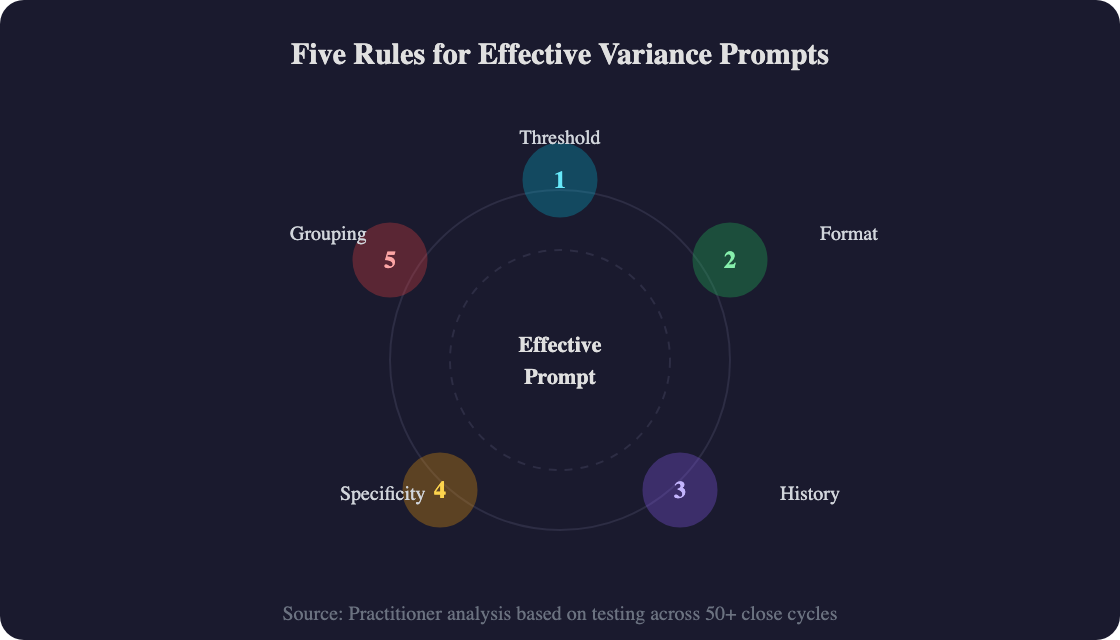
Rule 1: Specify the threshold. "Flag material variances" produces noise. "$50K AND 10%" produces signal. Always define materiality in dollar AND percentage terms.
Rule 2: Define the output format. Tables, numbered lists, or narrative paragraphs tell the AI exactly what you need. "Format as a table with columns: Account, Variance, Commentary" is precise. "Write some commentary" is not.
Rule 3: Include historical context. Upload prior-period actuals and last month's commentary. The AI calibrates its explanations against patterns if marketing was over-budget last month and you explained it as a timing issue, the AI understands the ongoing context.
Rule 4: Mandate specificity. Add this line to every prompt: *"Every explanation must cite a specific driver. Do not use phrases like 'due to various factors' or 'reflecting general trends.'"* This single instruction eliminates 80% of generic AI output.
Rule 5: Separate favorable from unfavorable. Ask AI to group variances into favorable and unfavorable sections. This mirrors how CFOs read variance reports. They want to see the problems first, then the wins.
|
Contrarian take Most teams optimize their prompts for accuracy. That's table stakes. The real optimization is for *editing speed*. A prompt that generates commentary requiring 10 minutes of editing is better than one that generates more accurate commentary requiring 30 minutes of reformatting. Optimize the output format for your CFO's reading preference, not for technical accuracy alone. |
How Do You Integrate AI Commentary into Your Close Workflow?
At Fanatics Betting & Gaming, a custom AI workflow reduced a month-end close process from 20 hours to 2 hours (Bain Capital Ventures, 2025). You don't need custom development to get similar results. Here's the practical integration workflow.
Day 1 after close: Data export
- Export actuals from your GL/ERP
- Pull budget data from your planning system
- Combine into a single spreadsheet with standardized column headers
Day 1-2: AI commentary generation
- Upload to Claude or ChatGPT with the appropriate prompt from this tutorial
- Generate P&L commentary, balance sheet movements, and KPI scorecard
- AI produces first-draft output in 5-15 minutes per report type
Day 2: Analyst review and editing
- Review AI output against your knowledge of the business
- Correct any root cause explanations that miss context AI can't see
- Add strategic color ("we expect this trend to reverse in Q2 because...")
- Time: 45-90 minutes for a full set of commentary
Day 2-3: CFO review
- CFO reviews the edited commentary package
- Adjusts tone and adds forward-looking context
- Final commentary is ready for distribution or board deck integration
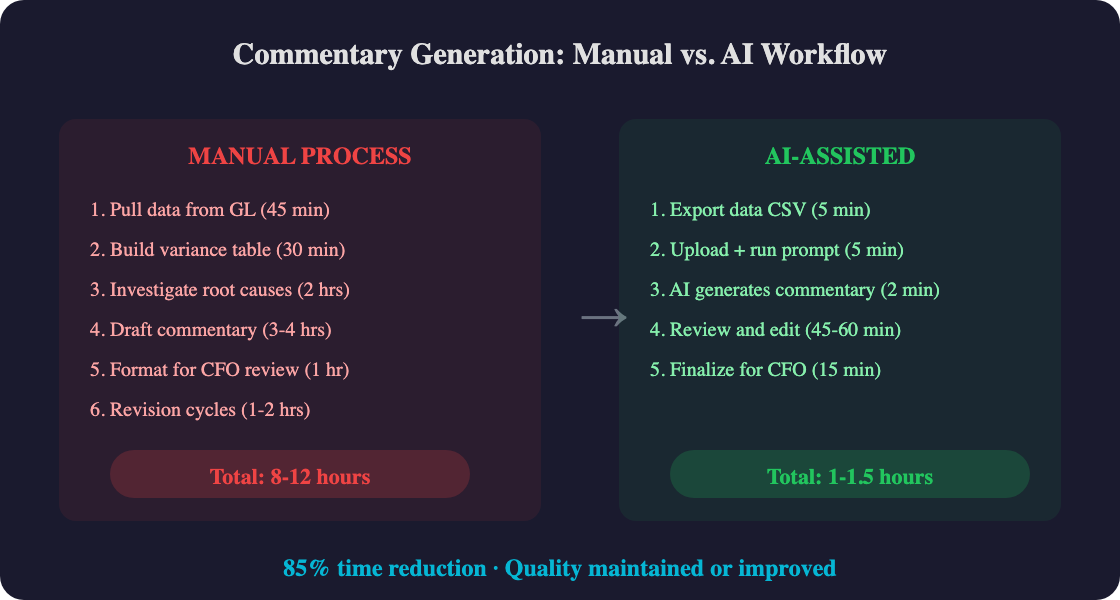
Total time investment: 2-4 hours instead of 8-12 hours. And the quality is often better because the analyst spends editing time on substance, not on writing from scratch.
For guidance on which AI tool handles financial commentary best, see our ChatGPT vs Claude for FP&A comparison.
Citation: Fanatics Betting & Gaming reduced a month-end close process from 20 hours to just 2 hours using a custom AI workflow, demonstrating that commentary generation and financial narrative automation represent the fastest path to close-cycle compression, achievable with general-purpose AI tools and no platform purchase required ([Bain Capital Ventures](https://baincapitalventures.com/insight/ai-and-the-office-of-the-cfo-in-2025/), 2025).
Frequently Asked Questions
How long does it take to generate variance commentary with AI?
AI generates first-draft commentary in 2-5 minutes per report type (P&L, balance sheet, KPIs). The analyst review and editing pass takes 45-90 minutes total. Compare that to 8-12 hours for manual commentary writing. Workday found 66% of FP&A teams already use AI for narrative generation, confirming this is a proven workflow, not experimental (Workday, 2025).
Do I need special software for AI variance commentary?
No. You need a CSV or Excel export of your actuals-vs-budget data and access to Claude or ChatGPT. No platform purchase, no API integration, no IT involvement. The prompts in this tutorial work with any AI assistant that handles file uploads. For teams wanting to scale beyond manual uploads, see our best AI tools for FP&A teams.
How do I handle confidential financial data with AI?
Use enterprise-tier AI tools (Claude Team/Enterprise, ChatGPT Team/Enterprise) that contractually guarantee your data isn't used for model training. For highly sensitive data, Claude Enterprise offers SOC 2 compliance and data isolation. Alternatively, anonymize the data replace company names and specific identifiers while keeping the numbers intact. The AI doesn't need to know it's your data to analyze it.
Will AI commentary sound generic?
Only if your prompt is generic. The prompts in this tutorial include specificity mandates ("cite a specific driver"), historical context (prior-month data), and formatting rules that produce commentary indistinguishable from human-written analysis. The key upgrade: include 2-3 months of your existing commentary so the AI matches your team's voice and level of detail.
How do I get my team to adopt AI commentary workflows?
Start with one analyst, one close cycle, one prompt. Have them run the AI-generated commentary alongside their manual process and compare. When they see 8 hours compressed to 90 minutes with equivalent quality, adoption happens organically. Protiviti's 2025 survey shows finance AI adoption doubled in a single year (from 34% to 72%) suggesting the value is self-evident once teams experience it (Protiviti, 2025).
Start This Month: Your First AI-Assisted Close
Variance commentary is the lowest-barrier, highest-impact AI use case in the month-end close. You don't need budget approval. You don't need IT support. You don't need a new platform. You need one CSV export, one prompt, and thirty minutes.
Key takeaways:
- 85% time reduction: Commentary generation drops from 8-12 hours to 1-1.5 hours per close
- Six tested prompts: P&L variance, revenue bridge, OpEx by department, balance sheet, cash flow, and KPI scorecard
- Five prompt rules: Set thresholds, define format, include history, mandate specificity, group by direction
- No platform required: CSV export + Claude or ChatGPT = working prototype in 30 minutes
- Quality improves with repetition: Include prior-month commentary to calibrate AI output each cycle
The 34% of teams not yet using AI for narratives are writing commentary the same way they did five years ago manually, slowly, and under deadline pressure. The tools to change that are already on your laptop. For the full picture on AI in financial planning, see our complete guide to AI in FP&A. Ready to automate the whole variance analysis workflow, not just the commentary? See our step-by-step guide to AI budget variance analysis.